Advanced Holodeck 9 – NFS Deployment
In a previous post I did some benchmarking of NFS storage in a holodeck environment. The performance gains over a nested vSAN environment were significant, so others may want to run this for their testing.
The automated holodeck provisioning is fantastic for vSAN OSA/ESA deployment but at the time of writing we do not have the capability for NFS Primary Storage out of the box.
This post will detail a simple & repeatable method for deploying a Management Domain with NFS storage. I’ll assume basic knowledge of Holodeck, a lot of that content is covered extensively elsewhere.
Overview of Steps:
1. Configure HoloRouter (v9.0.1 for this demo)
2. Deploy Nested Hosts and VCF Installer
3. Retrieve Holodeck Deployment JSON
4. Upload JSON to VCF Installer and edit for NFS
5. Deploy!
Step 1: We’ll create a new Holodeck Config and set as Dual Site:
SSH to your HoloRouter and run “pwsh” to start the powershell session.
PS /root> New-HoloDeckConfig -TargetHost vcenter.lab.home -username administrator@vsphere.local -Password xxxx04-12-2025 02:42:20 NewHoloDeckConfig[1841993]: [Success] Config Template integrity is verified successfully! No change in file hash.
04-12-2025 02:42:20 NewHoloDeckConfig[1841993]: [INFO] Initializing New HoloDeck Config
04-12-2025 02:42:20 NewHoloDeckConfig[1841993]: [INFO] Generating unique ConfigID…
04-12-2025 02:42:20 NewHoloDeckConfig[1841993]: [SUCCESS] HoloDeckConfig nmvc is generated successfully!
04-12-2025 02:42:20 NewHoloDeckConfig[1841993]: [INFO] Setiing up HoloDeckConfig nmvc…..
04-12-2025 02:42:21 NewHoloDeckState[1841993]: [INFO] Generating new dynamic state structureDirectory: /holodeck-runtime/stateUnixMode User Group LastWriteTime Size Name
-------- ---- ----- ------------- ---- ----
-rw-r----- root root 12/4/2025 02:42 0 holodeck-runtime-state_04Dec2025_02_42_21.json
04-12-2025 02:42:21 NewHoloDeckState[1841993]: [SUCCESS] HoloDeckState file is generated successfully!
04-12-2025 02:42:22 SetHoloDeckConfig[1841993]: [INFO] Updating the Global Config, ConfigKey: state, ConfigValue: /holodeck-runtime/state/holodeck-runtime-state_04Dec2025_02_42_21.json
ConfigID : nmvc
Description :
ConfigPath : /holodeck-runtime/config/nmvc.json
Created :
PS /root> Set-HoloRouter -dualsite
04-12-2025 02:42:31 HoloRouter-Setup[1841993]: [INFO] Configuring startup script
04-12-2025 02:42:41 HoloRouter-Setup[1841993]: [INFO] Configuring service configuration files
04-12-2025 02:42:45 HoloRouter-Setup[1841993]: [INFO] Configuring iptables
04-12-2025 02:42:46 HoloRouter-Setup[1841993]: [INFO] Configuring VLAN Interfaces
04-12-2025 02:42:46 HoloRouter-Setup[1841993]: [INFO] Installing NTP Server
04-12-2025 02:42:48 HoloRouter-Setup[1841993]: [INFO] Installing NFS Server
04-12-2025 02:42:51 HoloRouter-Setup[1841993]: [INFO] Deploying Kubernetes
04-12-2025 02:44:27 HoloRouter-Setup[1841993]: [INFO] Installing DNS & DHCP Server
04-12-2025 02:44:28 HoloRouter-Setup[1841993]: [INFO] Installing BGP Router
04-12-2025 02:44:29 HoloRouter-Setup[1841993]: [INFO] Waiting for FRR service
04-12-2025 02:44:59 HoloRouter-Setup[1841993]: [INFO] Installing Proxy Server
04-12-2025 02:45:32 HoloRouter-Setup[1841993]: [INFO] Installing Crontab
04-12-2025 02:45:33 HoloRouter-Setup[1841993]: [INFO] Adding DNSMASQ server as the default DNS Server
04-12-2025 02:45:33 HoloRouter-Setup[1841993]: [SUCCESS] HoloRouter Configured Successfully
04-12-2025 02:45:34 SetHoloDeckConfig[1841993]: [INFO] Updating the Global Config, ConfigKey: HoloRouterStatus, ConfigValue: Configured
Step 2: Now we can deploy the Holodeck Hosts. We’re going to use another switch here to only deploy the nested ESX hosts and NOT continue with a full bringup process “-ProvisionOnly”
PS /root> New-HoloDeckInstance -Version 9.0.1.0 -Site a -DepotType Online -ManagementOnly -ProvisionOnly
This will go through and deploy the VCF Installer, and 4x Nested ESX Hosts for us.
When it’s complete, we’ll have something like this:

Step 3: Now we can retrieve the JSON spec from the HoloRouter for the deployment.
There’s a message in the log output from the previous step that tells us where to obtain the JSON.
04-12-2025 03:25:17 HoloSite[1841993]: [SUCCESS] ProvisionOnly deployment complete. The json spec files are available for assistance in /holodeck-runtime/specs/ folder
04-12-2025 03:25:18 HoloSite[1841993]: [INFO] Please note the following with respect to the json spec files provided:
04-12-2025 03:25:18 HoloSite[1841993]: [INFO] The json spec for setting up management domain is available in /holodeck-runtime/specs/ folder and can be used in VCF Installer. The depot needs to be setup and biniaries need to downloaded before this json spec can be used for deployment.
04-12-2025 03:25:19 HoloDeck[1841993]: [SUCCESS] HoloDeck deployment completed successfully
Fire up your SCP client and download /holodeck-runtime/specs/management_domain_config_spec_for_vcf_installer_site-a.json from the HoloRouter.
Step 4: Configure NFS Share / VCF Installer
I have an NFS share configured on my Synology NAS, we need to take note of the Mount Path for the share. This step will vary based on your NFS server type.
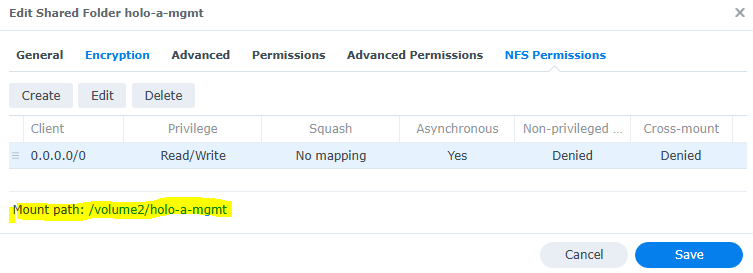
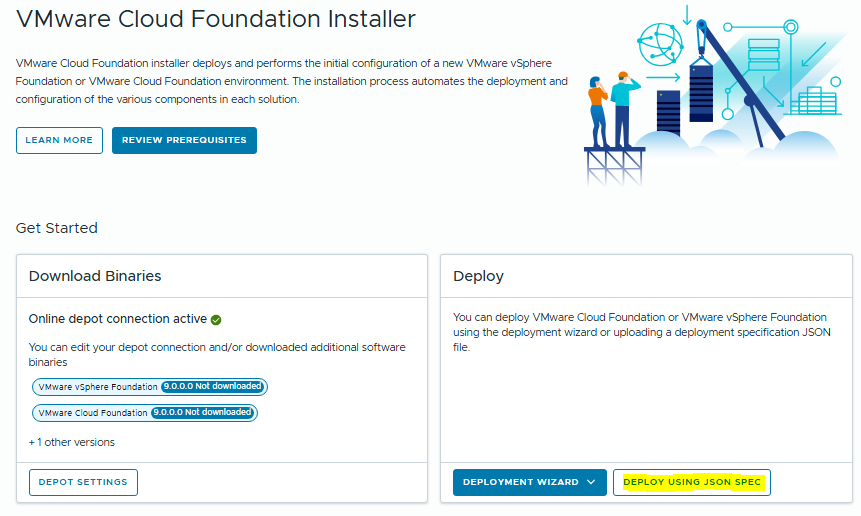
Now we open up the VCF Installer, configure the depot, download the binaries and we can start the config.
Select “Deploy Using JSON Spec”
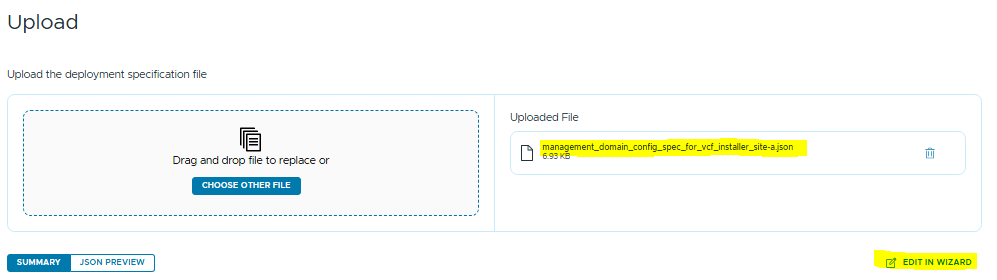
Select the JSON we downloaded in Step 3. This will pre-populate all of the installer fields with the Holodeck site-a defaults.
We want to select “Edit in Wizard” so we can edit the storage config.
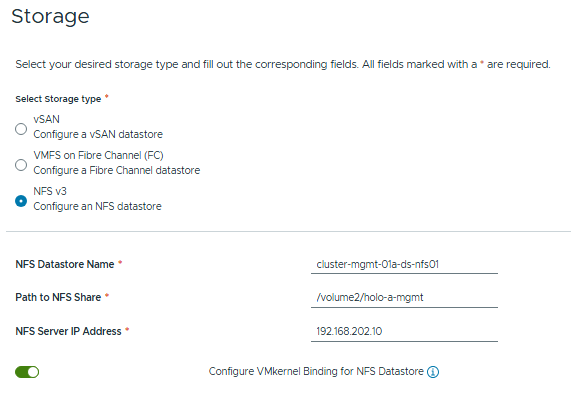
Now we skip through to the Storage Section. We enter the path to the NFS share and the IP address of the NFS server.
I’m going to select Configure VMernel Binding, as this will allow me to customise the network configuration that’s used for the NFS connection.
By default it will use the Management VMK, but this is going to route NFS traffic via the HoloRouter to the outside world – there’s going to be a performance hit.
My NFS share runs on VLAN 202, which is accessible via the Holodeck Trunk portgroup, so the nested environment will have direct access. Your network setup may differ here.
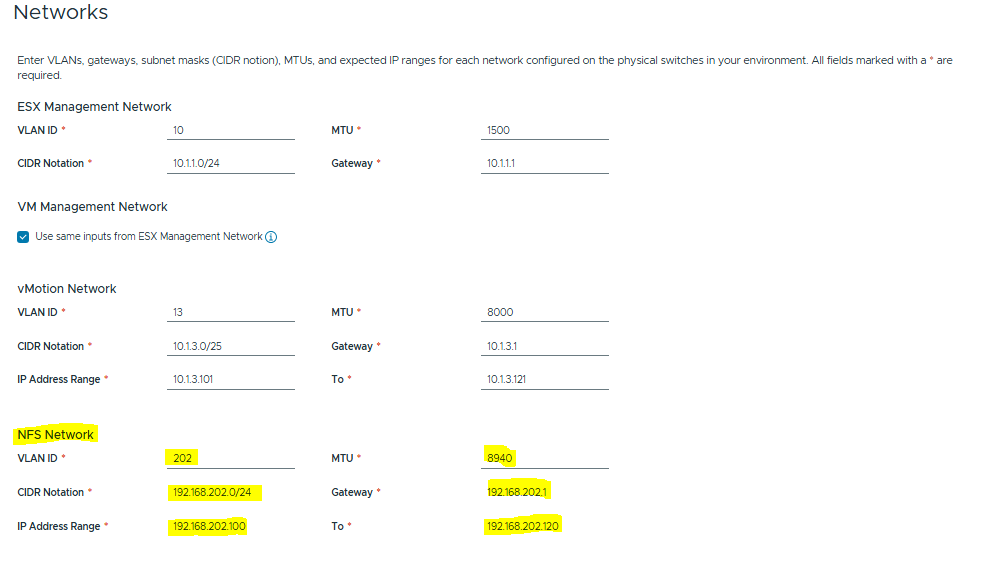
Now we configure the Network Pool for the NFS VMKs.
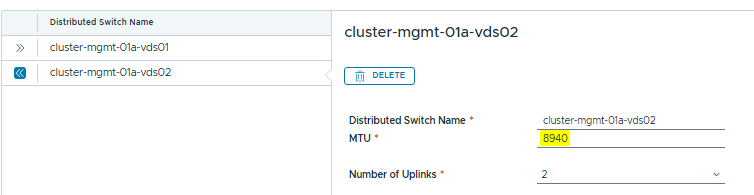
Note the MTU config and adjust for your network. 8940 is the maximum frame size for Jumbo frames when we are running nested.
Lastly we’ll do the network bindings. Holodeck uses the config “Storage Traffic Separation” which configures vds-01 for Management/vMotion/NSX and vds-02 for vSAN. We’ll just hijack vds-02 for NFS.
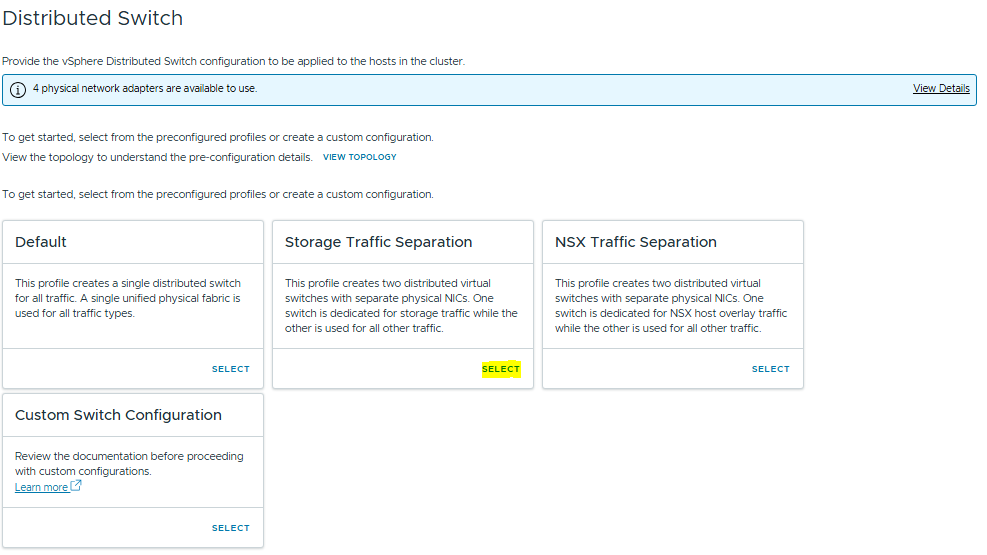
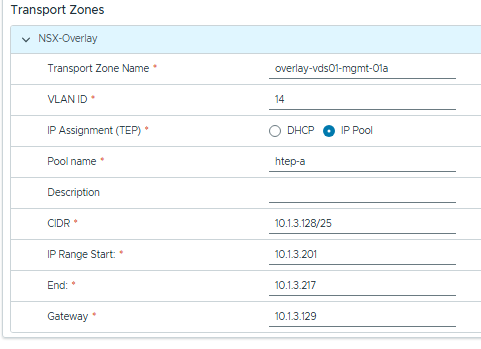
This wipes out some of the pre-configured Holodeck values so we’ll have to reset them on vds-01.
Set the MTU to 8000 and the Overlay details.
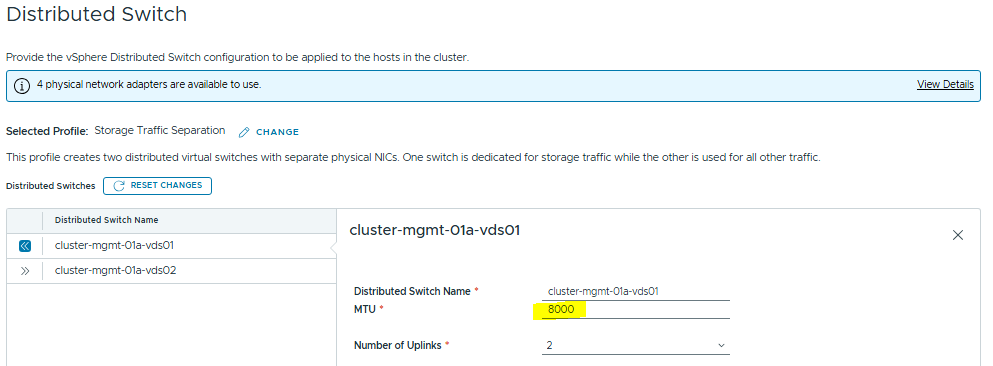
Now we configure the MTU on the NFS vDS, and we can click through to the summary.
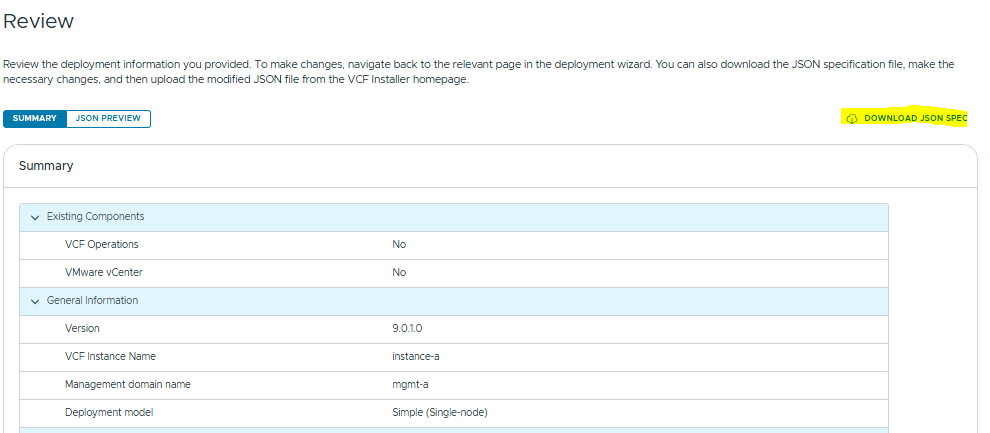
Now on the last page, we can download the updated JSON spec which will already include the NFS customizations we made to use for next time!
This ensures the process is easily repeatable, minimises any errors from manual input and speeds up your lab deployments.
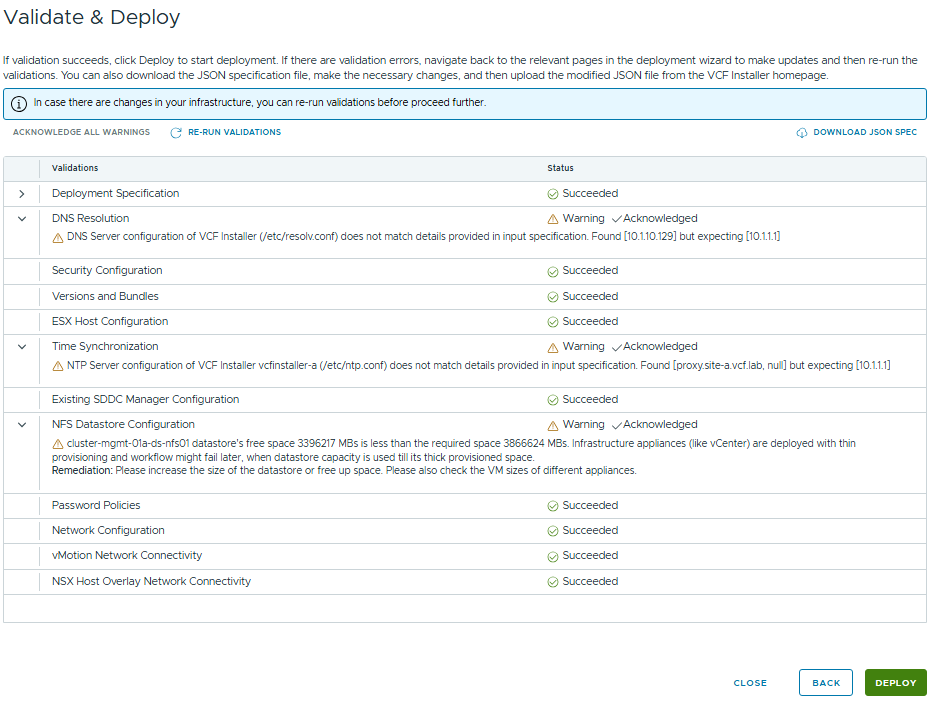
Run the Validations then if all is ok you can deploy!
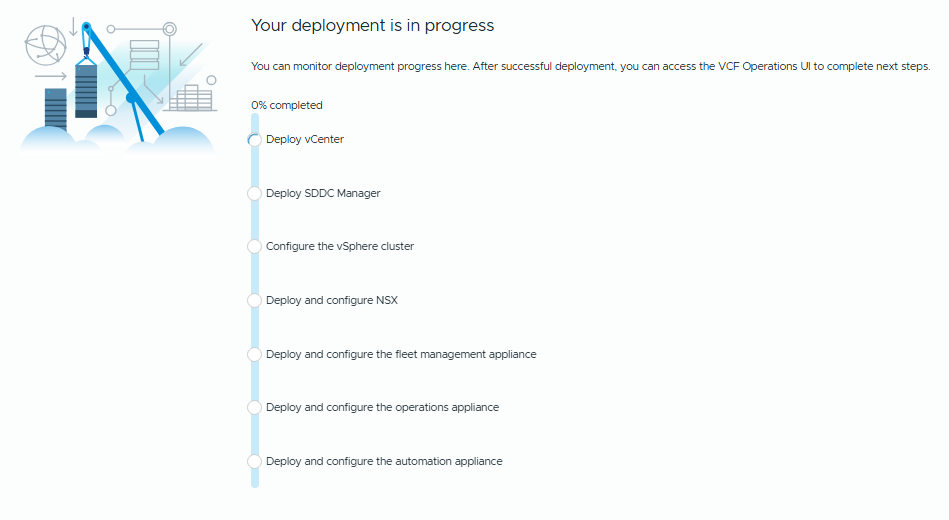
Now the deployment is underway, in a couple of hours it should be completed and you’ll have a Holodeck environment running on NFS.